Command-Type Data Groups
The IoT Sparkplug EIE allows a user to write a payload using a Sparkplug command manually through the "Command – Device" (CmdDev) or "Command – Edge Node" (CmdNode) data groups using the data group editor or via a UIS command. The commands are defined in the device template file and include commands such as DgHist (Data Group Transaction History), History (History Backfill), Rebirth, Reboot, ScanRate (Scan Rate), and UisCmd (Send UIS Command).
See UIS Command Component Parameters for more information.
| "Command - Device" Data Group | "Command - Edge" Node Data Group |
|---|---|
|
The "Command – Device" (CmdDev) data group sends a device Sparkplug command (DCMD). Commands are defined in the device template file in the "commands" section for a data group. The MQTT topic for a device Sparkplug command takes the form:
|
The "Command – Edge Node" (CmdNode) data group sends an Edge Node Sparkplug command (NCMD). Commands are defined in the device template file in the "commands" section for a data group. The MQTT topic for an Edge Node Sparkplug command takes the form:
|
|
See Topic Options for Data Group Properties for more information about these data groups. |
|
Configuring Command-Type Data Groups
The Command-type data groups are configured within the View Data dialog box of the data group. The dialog box has two sections: Topic configuration and the Command Type configuration. To configure the Topic section, see the IoT Sparkplug Data Group Properties table. The Command Type options are described below.
Command Type Data Group Properties
The following images show a View Data dialog box with the command configuration options for a CmdDev data group for the DgHist, History, and UisCmd commands.
|
|
|
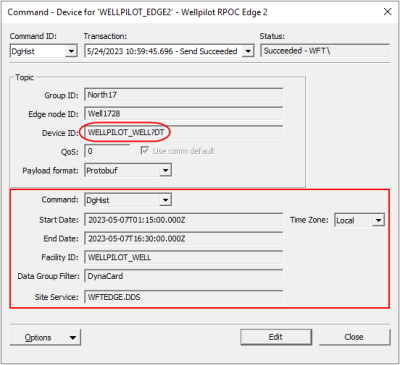
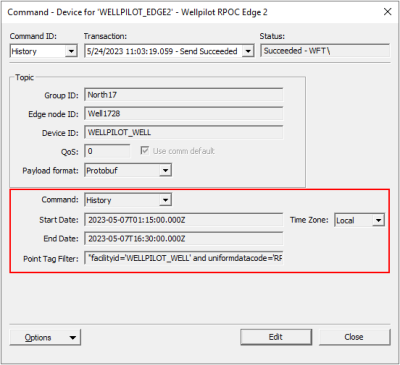
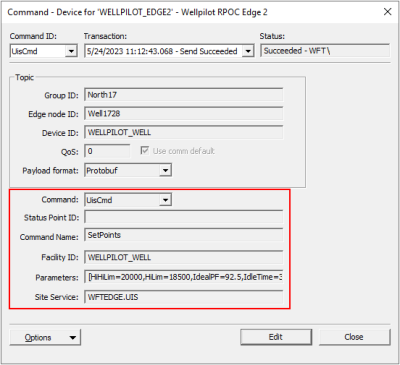
Note: In order to avoid MQTT topic collisions, and to differentiate at the topic level the type of data being published in the payload, Link requires that a suffix of "?<DATA_TYPE>" is appended to the Device ID for the DDS endpoint and VHS endpoint. In this example the Device ID is WELLPILOT_WELL?DT where DT indicates the type of data being published: DT = DynaCard transaction (published by the DDS endpoint). See Publishing CygNet Data to the MQTT Server for more information.
Command Type Properties
To configure the command for a "Command – Device" (CmdDev) or "Command – Edge Node" (CmdNode) data group, make selections from the fields below the Topic section.
| Property | Description |
|---|---|
|
Command |
The type of command. Select an option from the drop-down menu. Commands are defined in the device template file, and include the following options:
Each command type includes further required and optional properties. The properties displayed under the Command drop-down menu will change depending on the command type selected. |
|
Command Name |
Specify the name of the command on the device receiving the UIS Command, e.g., the UIS command on the EDGE device. |
|
Description |
Displays the description of the command from the device template file, e.g., DgHist, Rebirth, UisCmd, etc. |
|
Data Group Filter |
Specify the name(s) of any data groups used to limit the data group transaction history, e.g., DynaCard. |
|
End Date |
Specify the end date for the data in the payload in ISO 8601 format, e.g., YYYY-MM-DD Th:mm:ss.sss or 2024-01-01T18:00:00.000Z. ISO 8601 date and time format is the only accepted timestamp format. Note: Data group transaction history for dynacards and point history timestamps must use ISO 8601 format. The IoT Sparkplug EIE is very specific in the timestamp format it accepts — the ISO 8601 format is the only accepted string, e.g., 2024-01-01T05:45:15.123Z. |
|
Facility ID |
Specify the facility ID of the facility on the device receiving the command, e.g., the EDGE device. |
|
Facility ID.UDC |
Specify a Facility ID and UDC, or browse to open the Choose UDC for element dialog box. The Facility ID is used only in point processing. |
|
Parameters |
Specify any optional command parameters and values used by the UIS command in a comma-separated list inside square brackets. For example, Use this format when sending send a UIS command with multiple command parameters from the Data Group dialog box, a pre-configured command in the UIS Command dialog box, or via the API. See UIS Command Component Parameters for more information. |
|
Point Tag Filter |
Specify a filter to limit the point tags to publish in the history backfill command. This matches the pointFilter member specified in the publish object of the CVS endpoint in the Link appsettings.json file. For example, Note: When including a facilityid in a Point Tag Filter, the |
|
Site Service |
Specify the name of the Site Service on the device receiving the command, e.g., the Site Service on the EDGE device. |
|
Start Date |
Specify the start date for the data payload in ISO 8601 format, e.g., YYYY-MM-DD Th:mm:ss.sss or 2024-01-01T18:00:00.000Z . ISO 8601 date and time format is the only accepted timestamp format. Note: Data group transaction history for dynacards and point history timestamps must use ISO 8601 format. The IoT Sparkplug EIE is very specific in the timestamp format it accepts — the ISO 8601 format is the only accepted string, e.g., 2024-01-01T05:45:15.123Z. |
|
Status Point ID |
Specify the ID of the Status Point for the command, if used. A Status Point is a special CygNet point that is used to monitor the status of a UIS command. When a command is in progress (that is, it’s in the communications queue), the value of the Status Point is set to "1:In Progress". Once the command fails or succeeds, the value of the Status Point is set to "2:Failed" or "3:Succeeded," respectively. |
|
Time Zone |
The time zone of the start and end dates for the historical data in the payload. Select an option from the drop-down menu:
CygNet (and Sparkplug) always define date and time in UTC format, and Link expects UTC format. Any time zone adjustments need to be handled by the client, e.g., if sending via script. If Local is selected CygNet will convert any timestamps to UTC. The conversion from Local time to UTC is done by the client. When sending the command from the data group editor, that client has the option to adjust for time zone. When sending from a UIS command, it is up to the sender / client to make any time zone adjustments. |
|
Value |
Displays the value of the command from the device template file (if indicated) or allows an entry in the field when not set in the device template file. |

